Sales roadmap
Understand the next step in the sales journey.
Sign in with your own approved account. Open Sales roadmap through the sidebar or Master setup. Some actions require administrator/manager permission. Screens use anonymized test data; sample totals are not your company results.
What to do
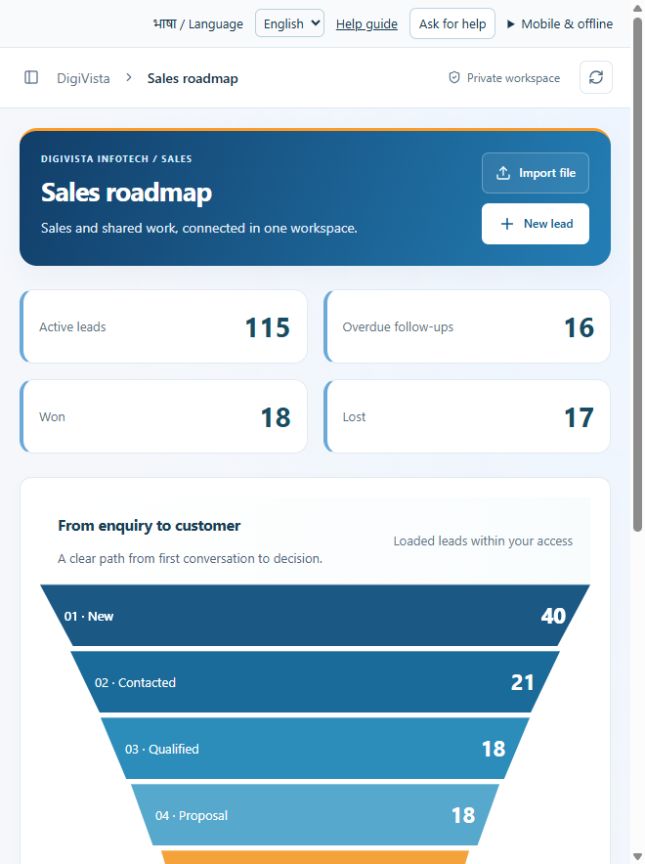
- Review stage counts and active-lead totals.
- Choose a funnel stage to open its matching leads.
- Review the suggested next action and update the relevant lead.
Check the result
The funnel describes accessible records and provides a route to the work behind each count.
Screen markers
- 1. 01 · New40
- 2. 02 · Contacted21
On narrow screens, scroll to reach the remaining form fields and actions. Close help to return to your unfinished form.
Why and how this activity works
New → Contacted → Qualified → Proposal → Negotiation → Won / Lost. Log each meaningful conversation and next action. Qualification stores requirements, service, estimated budget and expected closing date. Lost opportunities need a reason. Pipeline values are estimates, not booked revenue. Separate customer opportunities allow repeat business without duplicating the customer lead. The roadmap is guidance; signatures, invoicing and automatic project handover are not connected.
हिन्दी में समझें
बिक्री ऐसे आगे बढ़ती है: नई लीड → बात हुई → ज़रूरत पता चली → कोटेशन → कीमत पर बात → बिक्री हुई या नहीं हुई। हर बातचीत और अगला कदम दर्ज करें। ग्राहक की सेवा, ज़रूरत, बजट और अपेक्षित तारीख भरें। बिक्री न हो तो वजह लिखें। राशि अभी अनुमान है, वास्तविक आय नहीं। पुराने ग्राहक की नई बिक्री के लिए नया मौका बनाएँ, दूसरी लीड नहीं। ई-साइन, बिल और प्रोजेक्ट टीम को अपने-आप सौंपना अभी नहीं जुड़ा है।
If something is missing or fails
Check role access, selected record and filters. Read validation errors before retrying. For a conflicting edit, refresh and review the current record. A saved setting does not prove a provider connection is active.
Full topic and field help · All screen guides · Learning centre