Sales goals
Compare planning targets with weighted opportunities.
Sign in with your own approved account. Open Sales goals through the sidebar or Master setup. Some actions require administrator/manager permission. Screens use anonymized test data; sample totals are not your company results.
What to do
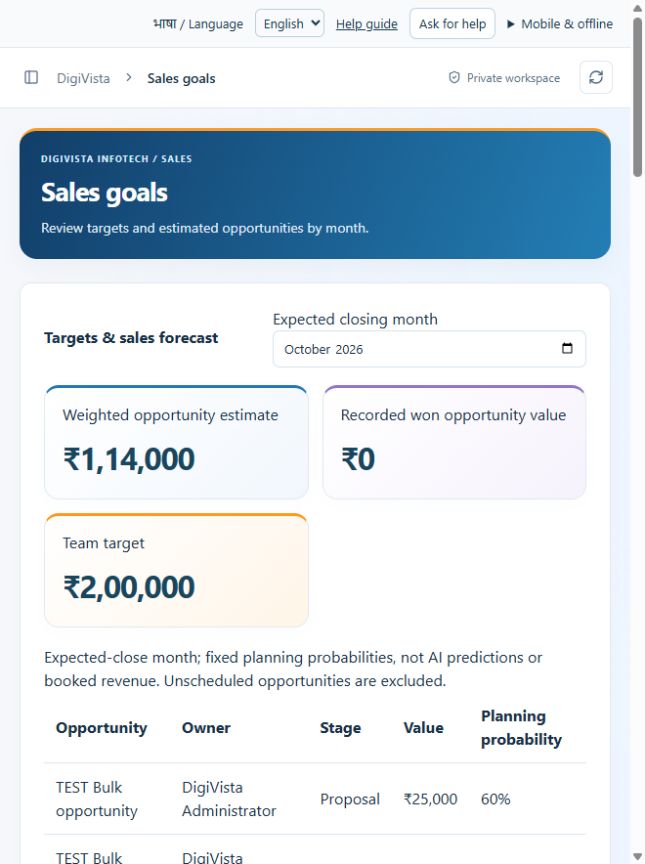
- Choose the expected closing month.
- An administrator sets agreed salesperson targets.
- Review actual stage/value/date inputs and the weighted estimate.
Check the result
The selected month is used consistently; the forecast is an estimate rather than collected revenue.
Screen markers
- 1. Expected closing month
On narrow screens, scroll to reach the remaining form fields and actions. Close help to return to your unfinished form.
Why and how this activity works
Choose Sales goals and expected closing month. Admin sets individual INR targets. Opportunities with an expected closing date in that month are included. Weighted estimates use fixed stage probabilities: New 10%, Contacted 20%, Qualified 40%, Proposal 60%, Negotiation 80%, Won 100%, Lost 0%. These are planning assumptions, not AI predictions, receipts or booked revenue. Leads and opportunities are not added together because they may describe the same sale.
हिन्दी में समझें
Sales goals में महीना चुनें। Admin हर व्यक्ति का रुपये में लक्ष्य तय करे। उसी महीने में बंद होने वाली opportunities का अनुमान दिखेगा। बिक्री के चरण से अनुमान निकलता है। यह मिला हुआ पैसा या पक्का revenue नहीं है। तारीख नहीं वाली opportunity इस अनुमान में नहीं आती।
If something is missing or fails
Check role access, selected record and filters. Read validation errors before retrying. For a conflicting edit, refresh and review the current record. A saved setting does not prove a provider connection is active.
Full topic and field help · All screen guides · Learning centre