My Day
Start with the next action instead of checking every record.
Sign in with your own approved account. Open My Day through the sidebar or Master setup. Some actions require administrator/manager permission. Screens use anonymized test data; sample totals are not your company results.
What to do
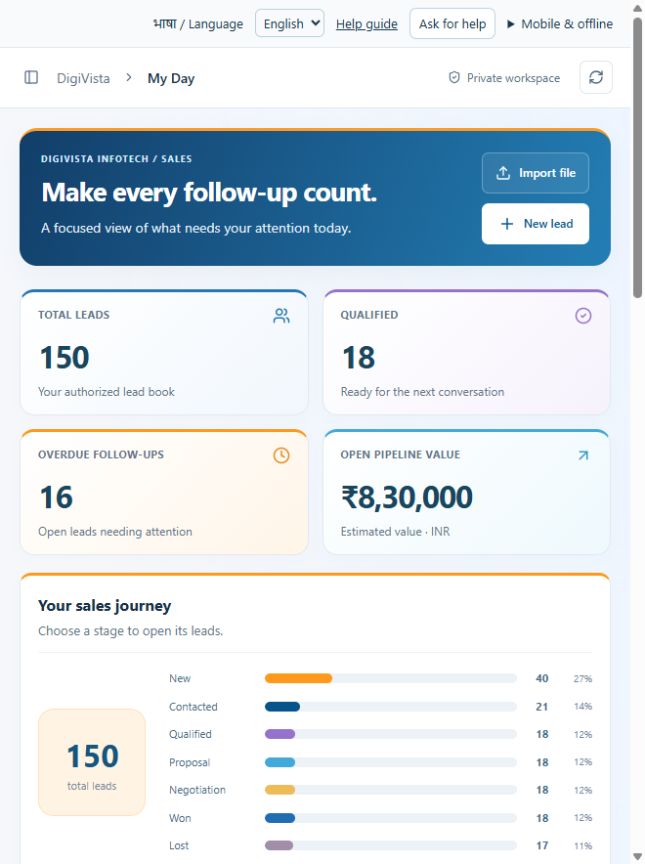
- Review overdue follow-ups and the open pipeline.
- Choose a sales-journey stage to open its leads.
- Open a priority lead and record the conversation and next follow-up.
Check the result
Recorded next actions are visible in the appropriate lead and follow-up view.
Screen markers
- 1. Import file
- 2. New lead
- 3. New: 40 leads
On narrow screens, scroll to reach the remaining form fields and actions. Close help to return to your unfinished form.
Why and how this activity works
My Day shows next actions and overdue open leads. Owner brief summarises new leads, overdue follow-ups, logged calls, task exceptions and team workload in the signed-in user’s authorised scope. Open an exception to assign a next step. Totals describe recorded work; unlogged calls or effort are unknown. Open screens refresh periodically. Scheduled background delivery requires a configured job runner and is not active merely because a brief time is saved.
हिन्दी में समझें
आज का काम में देखें कि किससे संपर्क करना है और किसकी तारीख निकल गई है। मालिक के सारांश में नई लीड, पुराने संपर्क, दर्ज कॉल, रुका काम और टीम का काम दिखता है। समस्या खोलें और अगला कदम तय करें। जो काम दर्ज नहीं हुआ है, सीआरएम उसे नहीं जानता। खुली स्क्रीन अपने-आप ताज़ा होती है। रोज़ का संदेश अपने-आप भेजने के लिए अलग सेटअप चाहिए; सिर्फ समय भरने से संदेश नहीं जाएगा।
If something is missing or fails
Check role access, selected record and filters. Read validation errors before retrying. For a conflicting edit, refresh and review the current record. A saved setting does not prove a provider connection is active.
Full topic and field help · All screen guides · Learning centre