IT service catalogue
Reuse standard descriptions, rates and service scope.
Sign in with your own approved account. Open IT service catalogue through the sidebar or Master setup. Some actions require administrator/manager permission. Screens use anonymized test data; sample totals are not your company results.
What to do
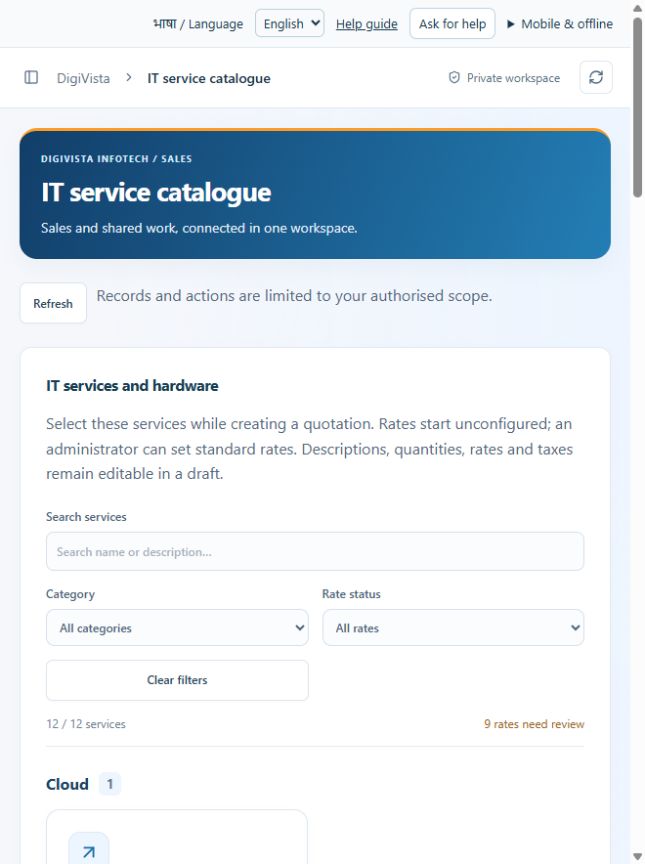
- Search services and filter category or rate status.
- Review the applicable service description, rate, tax and unit.
- An administrator opens the editing action, enters approved values and saves; verify the refreshed service.
Check the result
New service selections use the updated master; existing quotation snapshots are preserved.
Screen markers
- 1. Refresh
- 2. Search services
- 3. Category
On narrow screens, scroll to reach the remaining form fields and actions. Close help to return to your unfinished form.
Why and how this activity works
Catalogue includes website creation, domain registration/renewal, web hosting, firewall supply/configuration, web/mobile application development, laptop supply, AMC, cloud/email migration and networking. Administrators set standard descriptions, prices, tax percentages and units. Initial rates/taxes are unconfigured zero placeholders, not free offers or tax advice. Confirm each commercial scope, licence/subscription period, hardware specification, warranty, exclusions and applicable tax before quoting.
हिन्दी में समझें
सूची में वेबसाइट, डोमेन, होस्टिंग, फ़ायरवॉल, वेब/मोबाइल ऐप, लैपटॉप, एएमसी, क्लाउड/ईमेल माइग्रेशन और नेटवर्क हैं। एडमिन सेवा का विवरण, कीमत, टैक्स और इकाई तय करें। शुरू में शून्य कीमत का मतलब कीमत अभी नहीं भरी गई है; सेवा मुफ़्त नहीं है। ग्राहक को भेजने से पहले काम, लाइसेंस अवधि, हार्डवेयर, वारंटी, अपवाद और टैक्स जाँचें।
If something is missing or fails
Check role access, selected record and filters. Read validation errors before retrying. For a conflicting edit, refresh and review the current record. A saved setting does not prove a provider connection is active.
Full topic and field help · All screen guides · Learning centre