Follow-ups
Work in due-date order and reduce missed conversations.
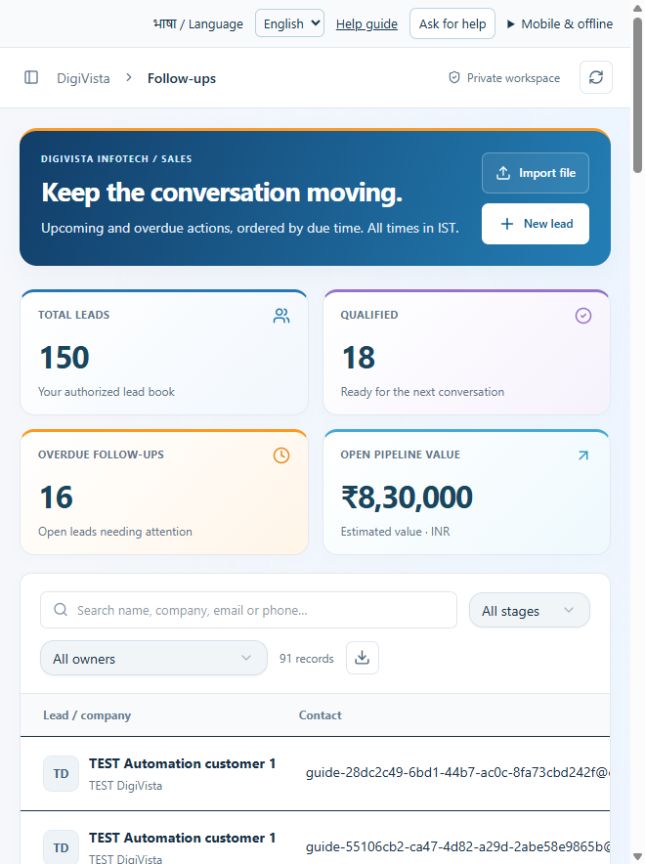
Sign in with your own approved account. Open Follow-ups through the sidebar or Master setup. Some actions require administrator/manager permission. Screens use anonymized test data; sample totals are not your company results.
What to do
- Search the customer and narrow by stage or owner.
- Open the matching lead and record what happened.
- Set the next follow-up date/time and save; refresh the view to verify it.
Check the result
The saved date appears in IST and completed sales do not remain open follow-up work.
Screen markers
- 1. Import file
- 2. New lead
- 3. Search leads
On narrow screens, scroll to reach the remaining form fields and actions. Close help to return to your unfinished form.
Why and how this activity works
Open Follow-ups to review scheduled and overdue conversations. Open the lead, record the call or note, and set the next follow-up date and time. Save and verify the updated date. Times are entered in the device timezone and displayed in IST. Closing help preserves unfinished form input.
हिन्दी में समझें
Follow-ups में तय और देर हो चुके संपर्क देखें। लीड खोलें, बातचीत लिखें और अगली तारीख व समय तय करें। सहेजकर जाँचें। समय डिवाइस के समय में भरें; भारतीय समय में दिखता है।
If something is missing or fails
Check role access, selected record and filters. Read validation errors before retrying. For a conflicting edit, refresh and review the current record. A saved setting does not prove a provider connection is active.
Full topic and field help · All screen guides · Learning centre