Access rights
Know which role can perform each activity.
Sign in with your own approved account. Open Access rights through the sidebar or Master setup. Some actions require administrator/manager permission. Screens use anonymized test data; sample totals are not your company results.
What to do
- Read the responsibilities of administrator, manager, sales, support and operations.
- Ask an administrator to review your named role and reporting relationship.
- Verify permitted actions with that staff account; do not share administrator credentials.
Check the result
Staff understand their authorised scope. This page explains access; it does not grant it.
Screen markers
- This is a reference page; review the role descriptions shown.
On narrow screens, scroll to reach the remaining form fields and actions. Close help to return to your unfinished form.
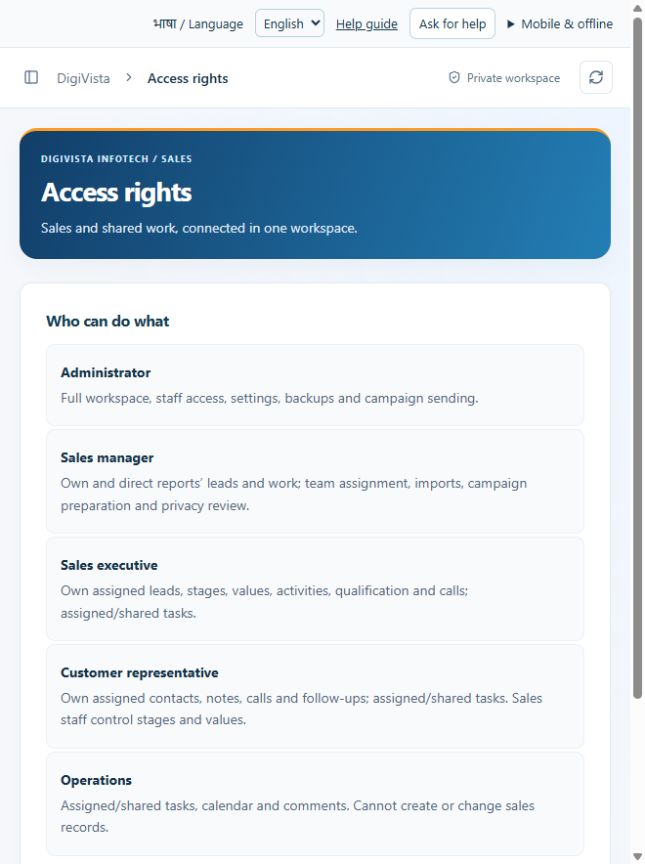
Why and how this activity works
ADMIN manages the workspace and company-wide records. MANAGER sees own and directly reporting sales records; may import, allocate and approve quotes within scope. EXECUTIVE works assigned sales records and quotation drafts. CUSTOMER_REP handles assigned contact activity and calls, with restricted sales changes. OPERATIONS works assigned shared tasks and comments. A collaborator/reviewer can access an assigned task without receiving unrestricted customer access. Staff membership does not itself grant hosting sign-in. Never share an administrator account.
हिन्दी में समझें
एडमिन पूरे सीआरएम का काम सँभालता है। मैनेजर अपने और सीधे रिपोर्ट करने वाली टीम के रिकॉर्ड देखता है; वह अपनी सीमा में लीड बाँट और कोटेशन मंज़ूर कर सकता है। सेल्स कर्मचारी अपनी लीड और कोटेशन पर काम करता है। ग्राहक सहायता कर्मचारी कॉल और बातचीत दर्ज करता है। ऑपरेशन कर्मचारी दिए गए कार्य और टिप्पणियाँ सँभालता है। किसी काम में मदद की अनुमति मिलने से सभी ग्राहक रिकॉर्ड नहीं मिलते। कर्मचारी जोड़ने के बाद उसका लाइव लॉगिन भी चालू करना होगा। एडमिन लॉगिन साझा न करें।
If something is missing or fails
Check role access, selected record and filters. Read validation errors before retrying. For a conflicting edit, refresh and review the current record. A saved setting does not prove a provider connection is active.
Full topic and field help · All screen guides · Learning centre