Connected CRM: six priorities
Use the same Hostinger Sales CRM. Pharma stock and workflows remain separate.
Pilot testing and pending tasks
Three roles have completed an isolated local pilot. Review the verified results and remaining live setup tasks; simulations do not certify production integrations.
Open pilot results and all pending tasks1 · BUSY billing sync
Signed snapshot receiver and sender are available. BUSY installation/API/export mapping, secret setup and an external runner are still required before automatic live sync works. Invoice and receipt entry stay in BUSY.
BUSY setup and tests- Map one BUSY party to an active CRM company ID.
- Send an invoice, retry unchanged, then send a newer cumulative payment.
- Verify incorrect customer, excessive payment and older conflicting snapshot are rejected.
- Cancel the invoice and confirm it is excluded from totals.
2 · Incoming email → reviewed lead
Connect a signed mailbox forwarding adapter to /api/integrations/email-bridge. Hostinger SMTP sending alone does not receive mail. Incoming mail appears in Inbox: matching existing contacts are reused; new senders require explicit conversion confirmation. Marketing permission remains separate.
- Send a controlled enquiry through the configured bridge.
- Confirm it appears in Inbox with correct sender and subject.
- Review and confirm Convert to lead; repeat the event and verify no duplicate.
- Check invalid signature/mailbox rejection. No customer email is sent by conversion.
3 · Follow-up automation
Administrator rules assign new leads and default follow-ups. Manual choices take priority. In-app reminders escalate overdue work to the reporting manager. A trusted schedule must run /api/jobs every five minutes for signed-out operation; scripts/run-background-jobs.mjs is supplied.
- Create a test rule and a new matching lead.
- Verify owner and follow-up; confirm existing leads are not reassigned.
- Run reminders twice; verify no duplicate daily reminder.
- Complete work or close its lead and check automatic follow-up handling.
4 · Customer 360
Open a lead to see accessible activity, message previews, calls, tasks, meetings, quotations, opportunities and linked-company billing. Filters isolate each event type. Unlinked records are not guessed from names. A company’s balance can cover multiple contacts; only managers/admins see financial records.
- Open a test lead, record activity and verify its timeline entry.
- Link the lead to its company; verify eligible billing is included.
- Log in as a restricted salesperson: another owner’s lead must not be accessible.
5 · Owner control centre
Open Owner brief for invoiced, received, outstanding, overdue follow-ups, open work, closed-lead conversion and collection/funnel charts. Metric buttons expose relevant record lists. Amounts are billing snapshots, not recognised accounting revenue. Latest 2,000 records per group are covered; truncation displays a warning.
- Compare issued invoice totals with Billing overview.
- Check partial payments and cancellations.
- Choose Outstanding, Follow-ups and Open work; confirm lists match the selected metric.
- Verify zero-data and no-closed-lead states without misleading percentages.
6 · Interactive page tours
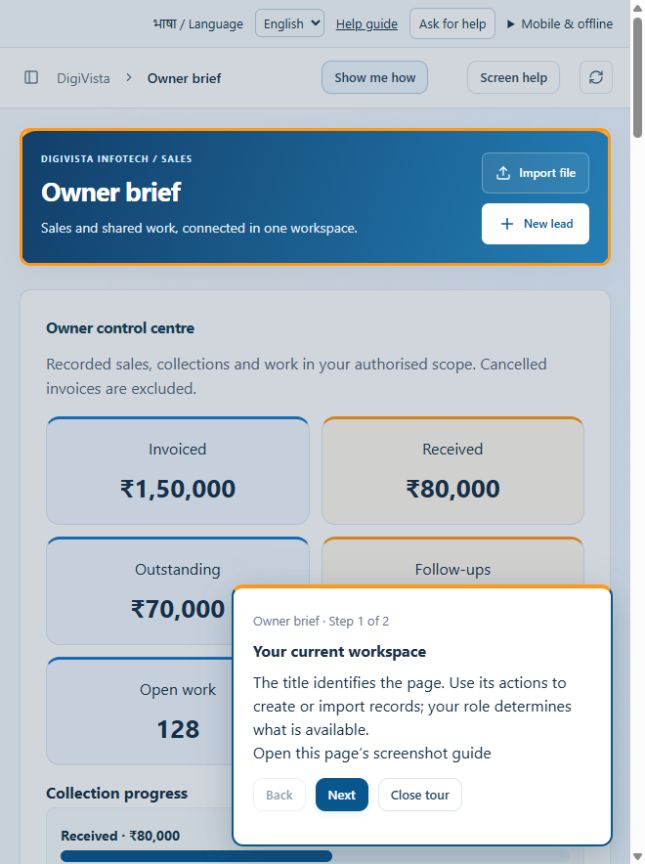
Use Show me how in the page header. The guide highlights visible controls without changing data. Next moves through the page; Back, Finish and Close tour keep control with you. Each tour links to its screenshot guide.
- Start a tour on My Day, Inbox, Billing overview and Master setup.
- Verify numbered steps highlight visible content; test Next, Back and Close.
- Check a narrow phone view and confirm unfinished form data remains intact.
Developer handover
Focused modules: lib/billing-sync.ts, lib/customer-360.ts, app/customer-timeline.tsx, app/owner-dashboard.tsx and app/guided-tour.tsx. Existing permission and audit mechanisms are reused. Credentials are environment variables and are never saved in public documentation. Record limits and provider dependencies are explicit.
Learning centre · Screenshot guides